I’m posting today as part of Plum and June’s “Let’s Figure it Out Together” series. Beth has collected a lot of great advice from craft bloggers on ways to improve your blogging experience. I encourage you to check out the entire series.

I’m going to give you a few easy tips on how to get more traffic to your blog, so you can share your craft with more people.
Have you ever done a Google Image search to find quilt inspiration? I do it all the time. Craft and quilt blogs are very visual in nature and having great photos is important. You want people to be able to find your photos when they do a Google search, which will in turn lead them to your awesome, inspiring blog.
There are 3 very simple steps you can do to make your images searchable:
1. Resize giant images.
2. Appropriately name your files.
3. Describe your image in the Alt Text box.
Resize Your Image
I tend to take HUGE photos on my fancy-schmancy camera and then upload them as is. This is a big no-no, because my 3000 x 3000 pixel photo will take way too long to load on many computers. Before you upload your photos to your blog, resize them to fit on your blog. Every blog has different proportions, but you generally want to keep your image size under 600 x 600.
You should be able to resize the images right on your desktop. I use Photoshop, or Preview on my Mac. You can also do it on PicMonkey. Just upload your image and click on “resize”.

Insert your new numbers in the “Change size to” boxes and click on “Apply”. That’s it!
Appropriately Name Your File

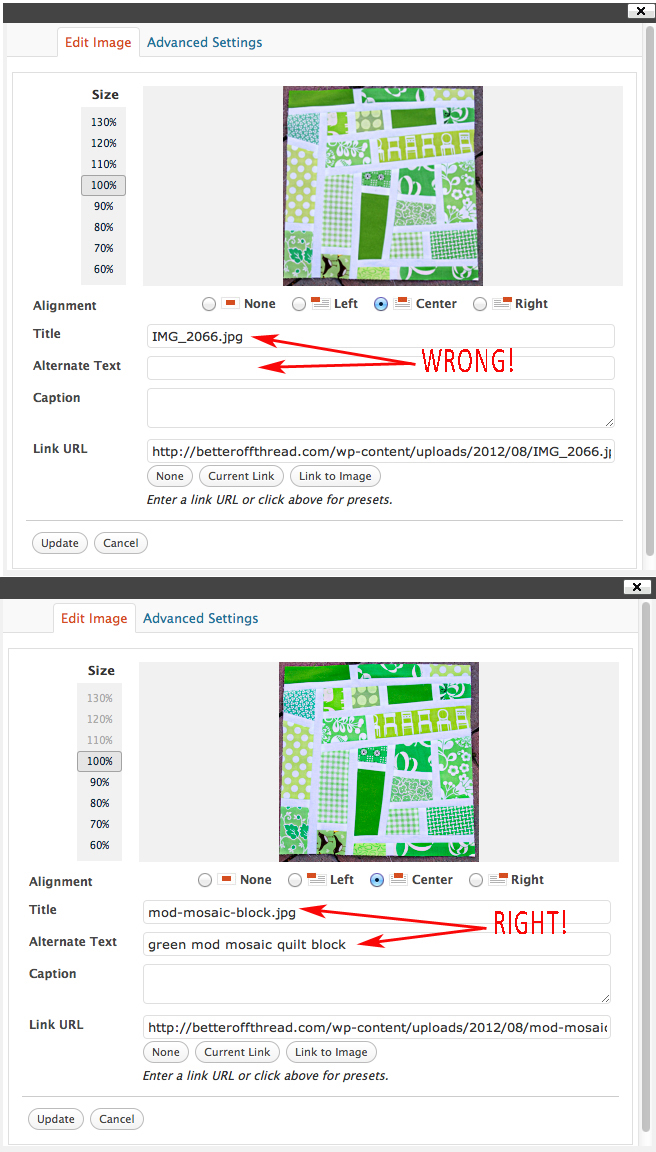
I am very guilty of being in such a hurry to get my blog post done that I just upload my photos without changing the file name to be descriptive. DO not upload “IMG_2066.jpg”. Upload the retitled “mod-mosaic-block.jpg”.
A couple of rules:
1. Do not use spaces, use hyphens between your words.
2. Keep it short, like 3 words.
3. Format your image in .jpg and include it at the end of the filename.
Describe Your Image in the “Alt Text” box
(see photos below for help in finding your “alt text” box)
Using the Alt Text box is the MOST important step you can take to make your images searchable. Search engines (like Google) can’t tell what your image is unless you fill in the Alt Text. Add a clear, simple, description of what the photo is. Think about how you would describe your photo to someone who is blind. Instead of saying “My latest quilt”, you would say something more descriptive like “Blue and Green Elephant Baby Quilt”. You are trying to get keywords in there, but don’t be spammy with it and make it 20 words long. I try to stick with about 5 descriptive words.
Below is what my image editing box looks like on WordPress. In the top image I simply uploaded the photo without changing the file name and I left the Alt Text box blank. Don’t do that! In the bottom image, I have appropriately titled my image and I have described it in the Alt Text box.
Most of the quilting blogs I read use Blogger as their platform, so I will show you that, too.

Click on the image you want to edit and a menu will open at the bottom of the image. Click on “Properties”.

A box will pop up titled “Image Properties”. This is where you fill in your image name and alt text.

Fill in your file name (using hyphens) and your descriptive Alt Text, click “ok” and you are done!
Now let’s all get busy and optimize our images!
Thanks for the great info. I need to reread more carefully and put some of this into action.
Janice, this is great! I had no idea, and I out of these 3 things I only ever do one of them – resizing. Thanks so much.
What a great post! I had no idea about these tips (apart from re-sizing). Thanks!
I had no idea about the Alt text thing! Thanks so much for a great post!
Great post Janice! I didn’t know about the alt text thing either. Thanks!
Great post! I’ve been trying to get better at it but I definitely need to remember to re-size my pics. Thank you!
Great post! I’m guilty of huge pictures and I never rename my files. I had no idea! I need to take more time editing but sometimes it’s just so darn time consuming. But I guess it’s super important!
Can you go back to older posts and change the names of the photos without having to reload them into the post?
You would need to change the file name on your computer and then re-upload your photos. I wouldn’t worry much about going back and redoing photos, though (unless it’s something special like a tutorial). Just concentrate on optimizing your images in future blog posts.
Such an awesome post! Thanks so much for the tips!!
I usually link my flickr photos directly…I’ll see if this works with those as well.
great post – really useful info 🙂
Thanks for the post, Janice. I’m going to check that field, pretty sure I am not using Alt test…
Thanks very much for all of the information, great post!
Finally! Maybe this will help as I have not had any comments on my blog, therefore I have not posted lately because I feel like I’m talking to myself!!!! I think my images are ok, but I need to do everything else you mentioned. Thanks for the info!
Kim cracked me up. I sometimes say blogging is talking to myself in black and white. I am glad to have this photo info.
I’m so glad you wrote this post! I would have never thought about this 🙂 Thanks for sharing.
I have the same question as Kathi. Can you do this to photos already on your blog? Picasa resizes mine when I upload and adds my copyright. I’ve also started adding a watermark that isn’t near the edge like my copyright is. I also try and add captions because I thought one of the Google videos said that was good for SEO. I’ll have to watch it again and see if it was the parts you are talking about instead.
You would need to rename the file and then upload it again. Do you link directly from Picasa? I think that gives Picasa your traffic and not your blog when someone searches images. I’ll have to check with my SEO friend. Adding captions are a great way to reinforce the ALT Image text. I don’t usually use captions simply because I don’t like how it disrupts the flow of my blog post, but it is a good tool for getting your keywords into your post.
I have the same question as Kathi. Can you do this to photos already on your blog? Picasa resizes mine when I upload and adds my copyright. I’ve also started adding a watermark that isn’t near the edge like my copyright is. I also try and add captions because I thought one of the Google videos said that was good for SEO. I’ll have to watch it again and see if it was the parts you are talking about instead.
This is great information, I appreciate you taking the time to show pic to my only image self brain
I have been looking for this info forever; your clear description and great photos are beyond helpful.
Thank you!!!
Becky
On 16 May 2006, Flickr updated its services from beta to “gamma”, along with a design and structural overhaul. According to the site’s FAQ, the term “gamma”, rarely used in software development, is intended to be tongue-in-cheek to indicate that the service is always being tested by its users, and is in a state of perpetual improvement.,^
Talk to you later
<http://www.caramoantourpackage.com/
Google’s rise to success was in large part due to a patented algorithm called PageRank that helps rank web pages that match a given search string. When Google was a Stanford research project, it was nicknamed BackRub because the technology checks backlinks to determine a site’s importance…
Most current content on our own website
http://homefamilydigest.com
Visit the link for a guide which includes some tips, documents and videos on how to make a better blog or website so that it is always remain knowned to Search Engines and your posts always showed on the Search Results of search Engines!
http://sohaiby.blogspot.com/2013/08/how-to-make-your-blog-seo-friendly.html
When someone writes an post he/she retains the idea of
a user in his/her brain that how a user can understand it.
So that’s why this article is perfect. Thanks!
I read this piece of writing fully concerning the difference of latest
and previous technologies, it’s amazing article.
First of all I want to say awesome blog! I had a quick question which I’d like to ask if you do
not mind. I was interested to find out how you center
yourself and clear your thoughts before writing. I’ve
had a tough time clearing my thoughts in getting my ideas out.
I truly do enjoy writing however it just seems like the
first 10 to 15 minutes are generally lost simply just trying to figure out how to begin. Any recommendations
or hints? Kudos!
Good article.
Great post. I was checking continuously this weblog and I’m
inspired! Extremely useful info specially the remaining phase 🙂 I take care of such information a
lot. I used to be seeking this particular info for a very lengthy time.
Thanks and best of luck.
I was recommended this blog through my cousin. I am no
longer certain whether this post is written by means of him as no one else recognise such unique about
my problem. You’re amazing! Thank you!
I loved as much as you’ll receive carried
out right here. The sketch is tasteful, your authored
material stylish. nonetheless, you command get bought an edginess over that you
wish be delivering the following. unwell unquestionably come more formerly again as exactly the same nearly very often inside case you shield this hike.
After looking at a handful of the blog posts on your
web site, I truly appreciate your way of blogging.
I bookmarked it to my bookmark website list and will be checking back soon. Take a look at my web site as well and let me know what you
think.
Fantastic website you have here but I was curious about
if you knew of any forums that cover the same topics talked about in this article?
I’d really love to be a part of community where I can get comments from other experienced
individuals that share the same interest. If you have any recommendations, please let me know.
Many thanks!
Asking questions are in fact pleasant thing if you are not understanding sometthing fully, however this post presents good understanding even.
We want to be your first-choice in Las Vegas
dentists for bridges, fillings, or any dental treatment.
as their chosen cosmetic dentist and again|Utter dental has everything any office that is upscale has.
discuss their knowledge and beautiful dental recovery|and
Dr.
If some one needs to be updated with hottest technologies after that he must be visit this web site and be up
to date daily.
Nice post. I learn something new and challenging on blogs I stumbleupon every day.
It will always be interesting to read articles from other authors
and use something from their websites.
This is a very good tip particularly to those new to the blogosphere.
Brief but very precise information… Many thanks for sharing
this one. A must read article!
Can you tell us more about this? I’d love to find out more details.
What’s Taking place i’m new to this, I stumbled upon this I have discovered It absolutely helpful and it has
aided me out loads. I am hoping to give a contribution & help different customers like its helped me.
Good job.